


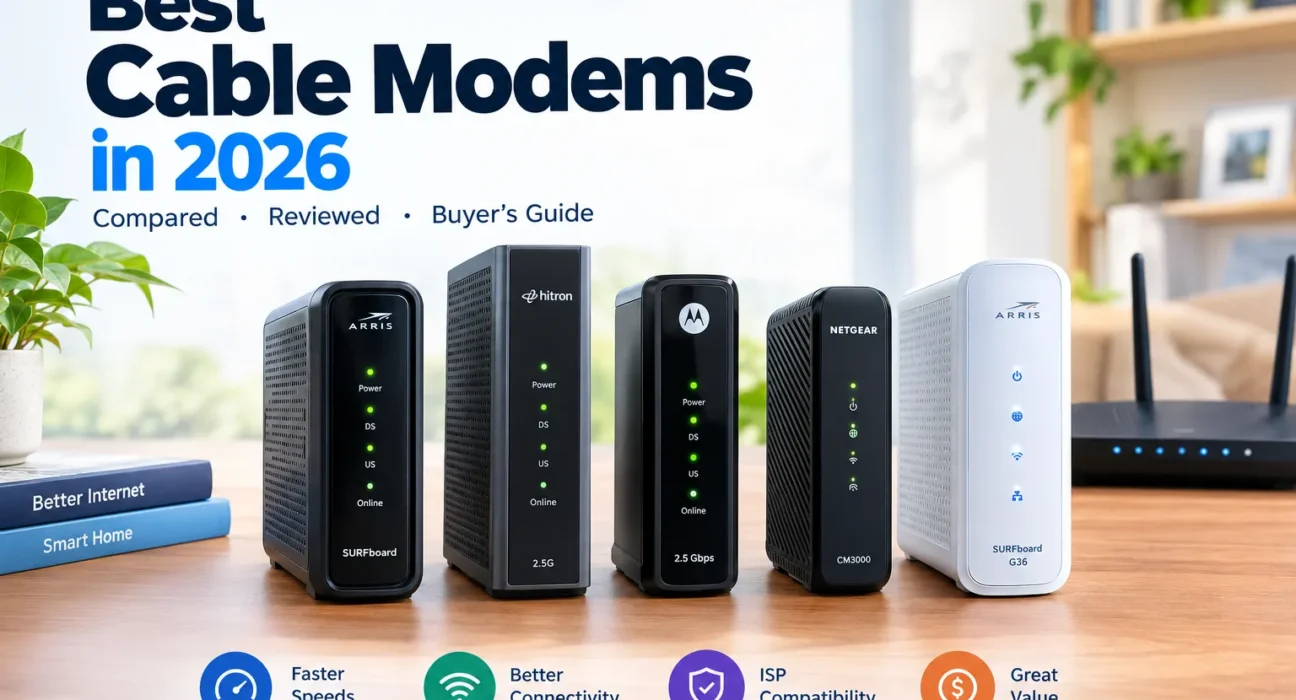
Best Cable Modems in 2026: Compared & Reviewed
Most people don’t buy the wrong cable modem because it’s a bad product. They buy one their internet provider won’t activate on their plan, or they pay for a 2.5 Gbps port their service can never fill. Cable modems are one of the few pieces of home networking where a single approved-device list decides whether your purchase works at all.
This guide compares five widely sold models for U.S. cable internet (Xfinity, Spectrum and Cox) by what actually affects your bill and your speeds: provider approval, upload support, Ethernet port speed, price against the monthly rental fee you’d stop paying, and ownership details like warranty length. The goal is to match a modem to your plan, not to sell you the fastest box on the shelf.
- Quick picks
- Comparison table
- How we selected
- Reviews
- By use case
- Compatibility
- How a modem works
- DOCSIS 3.0 / 3.1 / 4.0
- Buy vs rent
- Setup & fixes
- FAQ
- Final verdict
At a Glance: Our Quick Picks
Quick Comparison Table
Street prices below are rounded ranges seen at U.S. retailers in October 2026. Cable modems get discounted often, so treat them as a guide and check the live price before you buy.
| Modem | Best for | DOCSIS | Ethernet | Approx. price (USD) | Key consideration |
|---|---|---|---|---|---|
| ARRIS SURFboard S34 | High-speed and upload-heavy plans | 3.1 (32×8 + 2×2 OFDM/OFDMA) | 1x 2.5GbE + 1x 1GbE | $185–$220 | Gets warm; give it airflow |
| Hitron CODA56 | Value-focused multi-gig | 3.1 | 1x 2.5GbE | $120–$160 | Third-party sellers sometimes charge far more |
| Motorola MB8611 | Gigabit-class plans | 3.1 (32×8 + 2×2 OFDM/OFDMA) | 1x 2.5GbE | $140–$190 | Confirm upload tier support with your ISP |
| NETGEAR Nighthawk CM3000 | Xfinity 2 Gbps / high upload | 3.1 mid/high-split | 1x 2.5GbE | $225–$300 | Highest price; benefit depends on plan |
| ARRIS SURFboard G36 | All-in-one setups | 3.1 | 1x 2.5GbE + 4x 1GbE, Wi-Fi 6 (AX3000) | $200–$330 | Wi-Fi is not upgradeable; confirm speed rating |
Specs from ARRIS, Hitron, Motorola and NETGEAR product pages and data sheets; prices from Amazon, Best Buy, Newegg, Target and manufacturer listings. Verify before purchase.
How We Selected the Best Cable Modems
A cable modem is closer to a utility than a gadget. It either works on your line or it doesn’t, so our process starts with what your provider will accept and works outward from there.
ISP Compatibility
Is the exact model on the provider’s approved list, and for which speed tiers? This is the first filter and the one that can’t be negotiated.
Speed Capability
Does the modem’s rated capacity match what you pay for? A 2.5 Gbps modem on a 500 Mbps plan is wasted money.
Ethernet Connectivity
A 1GbE port caps wired throughput at roughly one gigabit. Multi-gig plans need a 2.5GbE port feeding a router with a matching WAN port.
Upload Performance
Newer cable plans increase upstream speed using split-spectrum changes. We check whether a modem supports the upstream configuration providers use.
Value for Money
We compare the purchase price against the rental fee you’d stop paying, which is where most buyers actually make their decision.
Ownership Experience
Warranty length, setup method, firmware handling, heat and the cost of replacing the unit if something fails.
Individual Cable Modem Reviews
ARRIS SURFboard S34
The S34 is the modem to look at if upload speed matters to you. Its data sheet lists a switchable diplexer (upstream 5–42 MHz or 5–85 MHz), which is what lets it support the optimized upload tiers some providers now sell. It pairs that with a 2.5GbE port and a second 1GbE port, so it works for current gigabit plans and has headroom for faster ones.
Pros
- Switchable upstream filter for newer upload tiers
- 2.5GbE plus a spare 1GbE port
- Two-year warranty
- Companion app for setup
Cons
- Owner reviews mention it runs warm in tight spaces
- Priced above the MB8611 and CODA56
- Early listings showed stock gaps at some sellers
Sources: ARRIS S34 data sheet; ARRIS product announcement; Best Buy and Newegg listings; owner reviews on Walmart.
Hitron CODA56
Hitron’s CODA56 is the value play: a 2.5GbE port and DOCSIS 3.1 at a price that often undercuts the big-name rivals. Hitron states it’s certified for Xfinity, Spectrum, Cox Gigablast, Sparklight and Zito, and that Xfinity customers can self-activate through the Xfinity app. It also explicitly lists what it won’t work with: AT&T, Verizon, CenturyLink, DSL, DISH, DirecTV and bundled voice service.
Pros
- Often the cheapest 2.5GbE modem here
- Broad cable-provider approval
- Xfinity app self-activation
- Cat6 cable in the box
Cons
- Listing prices fluctuate a lot between sellers
- Warranty terms differ by retailer
- No voice support
Sources: Hitron CODA56 product page; Newegg listings; Amazon price history trackers.
Motorola MB8611
The MB8611 has been a go-to for years because it does the basics very well: DOCSIS 3.1, 32×8 DOCSIS 3.0 fallback and a 2.5GbE port, with a two-year warranty and U.S.-based support from Motorola. Its data sheet makes a point worth remembering: a 1GbE port is a bottleneck on anything above gigabit service, and the 2.5GbE port removes that limit if your router has a matching WAN port.
Pros
- Long track record and frequent sales
- 2.5GbE port for multi-gig routers
- Two-year warranty, U.S. support
- Simple, no-frills setup
Cons
- Not marketed around the newest upload tiers
- Warranty period differs between retailer listings (1 vs 2 years seen)
- Older design than the S34
Sources: Motorola MB8611 data sheet; Best Buy listing; SpeedGuide hardware database; Slickdeals price history.
NETGEAR Nighthawk CM3000
The CM3000 is built around mid/high-split technology, which expands the spectrum used for upload. NETGEAR positions it for the fastest cable tiers, such as Xfinity’s 2 Gbps download and 200 Mbps upload plans, and lists up to 2.5 Gbps down and 1 Gbps up as the modem’s capability. B&H lists Spectrum support at 1 Gbps down and 35 Mbps up, which shows why plan matters more than modem: the same hardware delivers very different results by provider.
Pros
- Designed for the highest upload tiers
- Strong fit for Xfinity 2 Gbps plans
- NETGEAR pairs it with WiFi 6E/7 routers
- Roomy upgrade path
Cons
- Most expensive modem in this guide
- Extra capability is wasted on slower plans
- No voice support
Sources: NETGEAR CM3000 product page; B&H listing; Abt listing; Slickdeals price history.
ARRIS SURFboard G36
The G36 folds a DOCSIS 3.1 modem and an AX3000 Wi-Fi 6 router into one device, with a 2.5GbE port and four 1GbE ports. It’s a tidy fit for apartments and smaller homes where one box on a shelf beats a modem, router and extra cabling. ARRIS says the Wi-Fi coverage reaches about 2,500 sq ft. Note that the product isn’t mesh-compatible, according to the Target listing, and it has no voice capability.
Pros
- One device instead of two
- Wi-Fi 6 with 2.5GbE port
- Approved for Xfinity, Spectrum, Cox
- Two-year warranty
Cons
- Wi-Fi 6 only, and you can’t upgrade the radios alone
- Not mesh compatible per retailer listing
- Retailer plan ratings disagree; verify with your ISP
- Used units can arrive tied to another account
Sources: SURFboard G36 product pages; Abt, Newegg, Target and Walmart listings.
Best Cable Modem by Use Case
Most Households
Match the modem to your plan, not to the highest spec. On a gigabit plan the Motorola MB8611 is the safe middle: proven, approved and frequently discounted.
Budget
The Hitron CODA56 usually has the lowest cost per feature. Compare the purchase price to your monthly rental fee and make sure the seller lists a warranty.
Gigabit Internet
You need a DOCSIS 3.1 modem approved for your tier. Any modem here qualifies, but a 2.5GbE port avoids the 1GbE port cap if you ever upgrade.
Multi-Gig Internet
Choose the S34 or CM3000, then pair them with a router that has a 2.5GbE WAN port. Otherwise the modem’s fast port has nothing to talk to.
Gaming
A modem can’t guarantee low ping. Latency depends on your ISP’s network, congestion and Wi-Fi, so a wired connection and reliable provider matter more than which modem you buy.
Telephone Support
None of the five here offer voice. Phone service needs a voice-capable modem your provider provisions. NETGEAR’s catalog includes a CM2050V for Xfinity Voice plans, so ask your ISP first.
Modem-Router Combo
The ARRIS G36 saves space and setup time. You trade away independent upgrades to your Wi-Fi hardware.
Cable Modem Compatibility: Check Before Buying
An incompatible modem is an expensive paperweight. Run this short checklist before you click buy, and tick items off as you go.
0 of 5 checks completed
Provider-by-Provider Notes
| Provider | What listings say | What to confirm |
|---|---|---|
| Xfinity | Fastest cable tiers listed by NETGEAR at 2 Gbps down / 200 Mbps up; Hitron lists plans up to 2.33 Gbps. Own-modem rental fee reported around $15/month. | Model on the Xfinity approved list; whether your tier needs mid/high-split; voice plans need different hardware. |
| Spectrum | Listings show 1 Gbps as the top tier many modems are certified for. Rental fee reported around $7–$10/month. | Spectrum’s approved list; many multi-gig modems won’t use more than 1 Gbps here. |
| Cox | Hitron lists plans up to 2 Gbps; rental fee reported around $13.99–$15/month. | Cox’s approved list; Cox has been reported to need a phone call for some activations. |
| Other cable providers | ARRIS lists Optimum, Suddenlink, Sparklight, Mediacom, WOW, RCN and others for the S34/G36 family; Hitron lists Sparklight and Zito. | Provider-specific lists. Never assume approval carries over between companies. |
What Is a Cable Modem and How Does It Work?
Your cable modem is the translator between the coaxial cable in your wall and the Ethernet your router understands. It doesn’t create Wi-Fi and it doesn’t make your plan faster. It just lets you connect to what the provider is already delivering.
- The coaxial cable connects the modem to the cable provider’s network.
- The modem converts the provider’s signals into a data connection your home network can use.
- An Ethernet cable links a standalone modem to a router or computer.
- A router shares the connection with phones, TVs and laptops, including over Wi-Fi.
- A modem-router combo, like the G36, performs both jobs in a single unit.
DOCSIS 3.0 vs 3.1 vs 4.0
| Feature | DOCSIS 3.0 | DOCSIS 3.1 | DOCSIS 4.0 |
|---|---|---|---|
| Position | Older generation | Established modern standard | Newer generation |
| Gigabit-class service | Depends on channel bonding and ISP | Commonly suitable when approved | Depends on deployment and device |
| Upload capability | More limited | Supports improved upstream configurations | Designed for stronger upstream and downstream |
| Availability | Legacy services and devices | Broad use across cable networks | Depends on your ISP’s rollout |
| Buying note | Check carefully before choosing | Safe baseline for most buyers today | Verify real local availability and certification |
The generation printed on the box doesn’t set your speed. Your provider’s network, hardware certification and plan limits do. Today, every modem in this guide is DOCSIS 3.1, which is why we treat 4.0 as a “check availability first” item rather than a reason to wait.
Should You Buy or Rent a Cable Modem?
| Cost factor | Buy your own | Rent from ISP |
|---|---|---|
| Initial cost | Higher (about $120–$300 for these models) | Usually low or none upfront |
| Monthly equipment charge | Can be avoided | Reported roughly $7–$15/month depending on provider |
| Maintenance and replacement | Usually your responsibility, plus the manufacturer warranty | Depends on provider terms |
| Technical support | Split between manufacturer and ISP | Often more integrated |
| Flexibility | Choose among approved models | Limited to provider hardware |
Break-Even Calculator
Break-even months = modem price ÷ monthly rental fee. Enter your own numbers below.
Real-world examples (using the typical figures above): a $190 modem against a $15 Xfinity rental pays for itself in about 12.7 months. A $140 modem against a $7 Spectrum fee takes about 20 months. If your plan includes a free modem, or a promotion waives the fee, buying may never pay off, so check your bill first.
Installation and Troubleshooting
How to Install a Cable Modem
- Check compatibility and activation requirements before you disconnect your existing equipment.
- Connect the coaxial cable firmly to the modem.
- Plug in power and wait for the lights to settle.
- Connect a computer or router with Ethernet.
- Complete your provider’s activation process, via app, website or phone.
- Run a wired speed test and compare it to your plan.
Common Problems
| Problem | What to check |
|---|---|
| Modem won’t connect | Coax connection, local outage, activation status and the status lights. |
| Internet keeps dropping | Cables, signal issues, ventilation (some owners report heat) and ISP status. |
| Speeds lower than expected | Your plan speed, a wired test, Ethernet port limits, the router, and congestion. |
| Modem won’t activate | Exact model approval, account provisioning, and whether a used unit is still tied to another account. |
| No Wi-Fi | A standalone modem has none; you need a router or a combo unit. |
Frequently Asked Questions
What Is the Best Cable Modem in 2026?
It depends on your provider, plan and budget. Our research-based pick for most buyers who want upload headroom is the ARRIS SURFboard S34; for value, it’s the Hitron CODA56 or Motorola MB8611. Confirm approval with your ISP first.
Is DOCSIS 3.1 Still Worth Buying?
For many current cable plans, yes. It remains the established standard and is what every modem in this guide uses. Check your provider’s requirements and any DOCSIS 4.0 rollout in your area.
Do I Need a Router with a Cable Modem?
A standalone modem needs a router if you want Wi-Fi or more than one wired device. A combo unit such as the G36 already includes one.
Will a Better Modem Make My Internet Faster?
Only if your current modem is the bottleneck and the new one is compatible. A modem can’t exceed your plan or your provider’s network limits.
Can I Use My Own Modem with Xfinity, Spectrum, or Cox?
Usually yes, but it depends on the exact model, your plan, your area and the provider’s list. Each of the three publishes an approved-device list.
How Long Does a Cable Modem Last?
There’s no fixed lifespan. Replace it when support ends, your provider changes requirements, reliability drops, or you outgrow its capabilities.
Does a Cable Modem Improve Gaming Ping?
Not necessarily. Latency depends on your ISP, congestion, routing and your home network. A reliable modem helps, but a wired connection matters more.
Is a Modem-Router Combo Better Than Separate Devices?
A combo simplifies setup. Separate devices are easier to upgrade, especially if you want to replace Wi-Fi hardware without touching the modem.
Final Verdict: Choose by What You Need
- Pick a value-focused modem (Hitron CODA56 or Motorola MB8611) if it supports your plan and covers the features you’ll use at a sensible price.
- Pick a multi-gig modem (ARRIS S34 or NETGEAR CM3000) if your ISP, plan, router and devices can take advantage of the extra speed and upload capability.
- Pick a modem-router combo (ARRIS G36) if simplicity and fewer boxes matter more than upgrade flexibility.
- Keep your current modem if it’s reliable, supported by your provider and already meets your plan.
One last reminder: verify the exact model on your provider’s approved list before you buy.
Sources and References
- ARRIS S34 data sheet and product announcement (surfboard.com; Cox-hosted PDF)
- Hitron CODA56 product page (us.hitrontech.com)
- Motorola MB8611 data sheet (Cox-hosted PDF); Best Buy listing
- NETGEAR CM3000 product page (netgear.com); B&H and Abt listings
- SURFboard G36 product pages (surfboard.com); Newegg, Target and Walmart listings
- Independent roundups: Tom’s Guide and SpeedTestHQ best cable modem guides; Clark.com on buying vs renting
- Slickdeals and Amazon price trackers for historical street-price ranges
Affiliate disclosure: TechNewGadgets may earn a commission when you buy through links on this page, at no extra cost to you. This doesn’t change which products we recommend or how we rank them.
Last reviewed: October 22, 2026. Prices, availability and ISP approvals change often. We schedule a compatibility and price review every six months.